Let’s get real, pretty websites don’t pay the bills. Photographers love Showit for its clean, modern designs and endless creative flexibility. It’s the platform that makes it possible to build a site that feels like your brand—elegant, stylish, and visually stunning. But here’s the hard truth: a beautiful website alone doesn’t book clients.
Too many photographers pour their energy into creating a site that looks like a curated gallery, only to discover it’s invisible online. Without proper SEO, that stunning portfolio is like opening a gorgeous studio in the middle of the desert. The walls may be filled with your best work, but no one will ever walk through the door if they can’t find you.
This is where SEO comes in. Search engine optimization is what puts your Showit website on the map, so clients searching “wedding photographer in Charleston” or “family portraits near Vancouver” discover your work instead of a competitor’s. Visibility is not just about ranking on Google. It is about opportunity, and in a saturated photography market, the ones who get found are the ones who get booked.
At Photographers Advantage, we’ve seen this story play out countless times. Photographers come to us with sites they love but that generate little to no leads. After applying our SEO systems, we’ve helped studios transform those same Showit sites into true booking machines, driving hundreds of qualified leads every month and scaling revenue into the six and seven figures.
If your site feels like a masterpiece that nobody sees, you’re not alone. This guide will show you how to turn your beautiful Showit website into a powerful client acquisition tool that gets you found, trusted, and consistently booked.
Why Showit SEO Matters for Photographers
When someone needs a photographer, they don’t flip through the Yellow Pages or scroll aimlessly on Instagram. They go straight to Google and type what they’re looking for: “Charleston wedding photographer,” “newborn photos in Vancouver,” or “personal branding photographer near me.” These are high-intent searches, and the photographers who show up in those moments win the client’s attention first.
Without SEO, your Showit site is like a beautiful gallery with no street address. People might stumble across it by chance, but the majority will never know it exists. With SEO, you plant your flag in the middle of town and hang a sign that says, “This is where to find the photographer you’re looking for.”
Now here’s where Showit is different. Photographers love the platform because it allows complete creative freedom. You can design layouts that look like your brand, integrate stunning galleries, and showcase personality in ways that template-based platforms never allow. But the same freedom can be a double-edged sword. Without careful optimization, the very elements that make a Showit site beautiful, like large image files, custom designs, and creative layouts, can also slow down performance and confuse search engines.
This makes SEO even more critical. Every title, meta description, image alt tag, and blog post on Showit needs to be set up strategically so Google understands what your site is about and where it should rank.
At Photographers Advantage, we’ve worked with countless Showit sites and understand the unique challenges they present. We’ve helped photographers optimize their designs without sacrificing creativity, so their sites not only look incredible but also rank high for the searches that matter most. SEO is what turns a Showit portfolio from an online showcase into a lead-generating booking machine.
The Showit SEO Basics Every Photographer Must Know
Showit gives photographers unmatched design freedom, but that same flexibility often leads to SEO mistakes. Unlike platforms that have rigid SEO structures built in, Showit leaves the control in your hands. That’s why knowing the platform-specific basics is critical. Here’s what matters most on Showit:
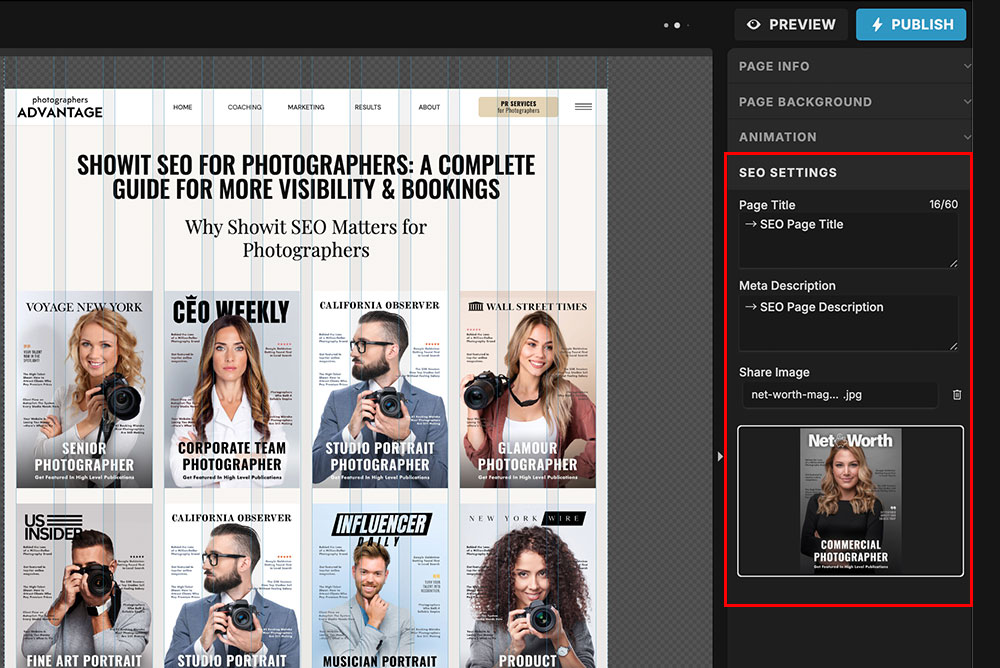
SEO Settings Panel
Each page in Showit has an SEO settings panel where you can set titles, meta descriptions, and share images. Many photographers skip this or use the same text across all pages, which hurts rankings. Every page needs unique, keyword-rich info tailored to your services and location.
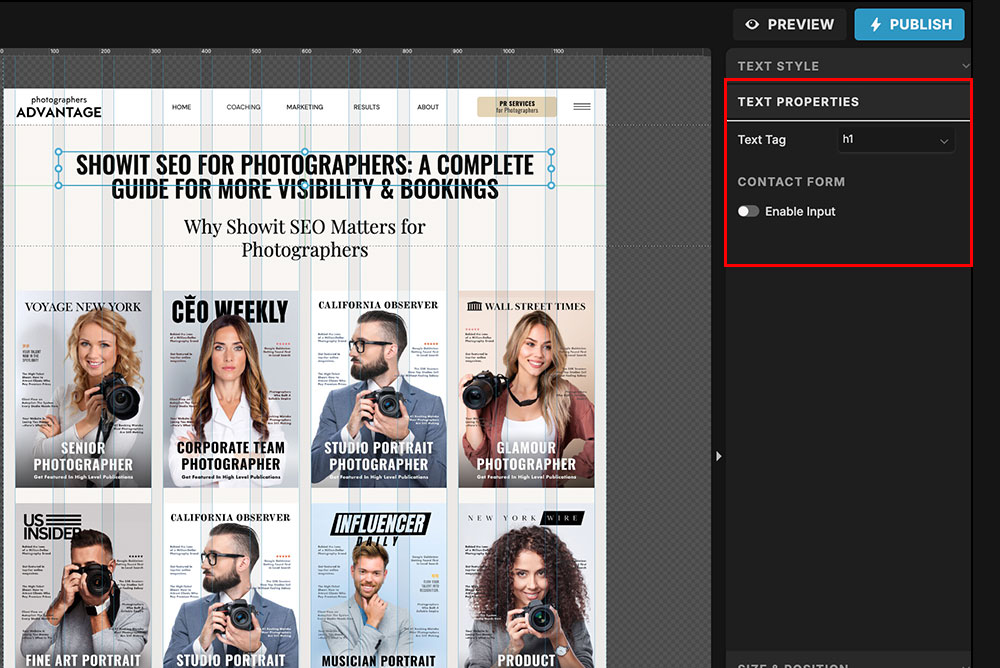
Canvas Titles and Headings
In Showit, you design with “canvases” instead of traditional page layouts. If you don’t assign headings properly inside these canvases, Google may struggle to understand your site’s structure. Think of headings (H1, H2, H3) as the table of contents that guides both visitors and search engines.
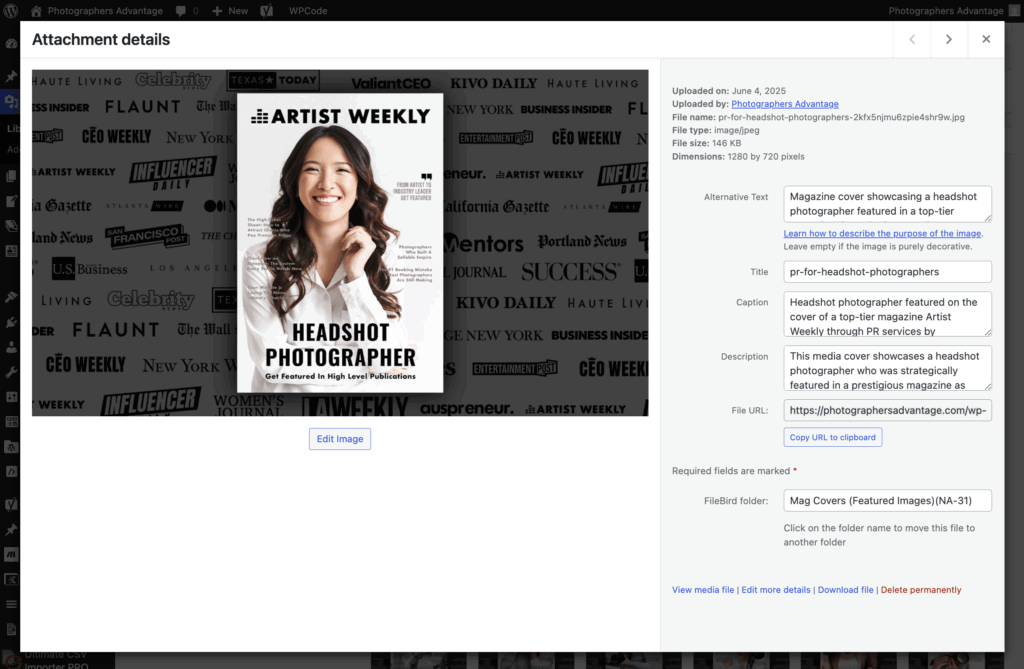
Image Alt Text in Media Library
Showit allows you to add alt text directly in the media library. This is where you can describe each photo with keywords like “Vancouver beach family photoshoot” or “Charleston luxury wedding photographer.” It’s a small step that makes a big difference in ranking for session types and locations.
Page Speed With Image-Rich Sites
Because Showit sites lean heavily on photography, oversized images are a common SEO challenge. Compress and resize before uploading, and use tools like TinyPNG. Fast-loading galleries keep clients engaged and prevent Google from penalizing your site.
WordPress Blog Integration
One of Showit’s biggest advantages is its ability to integrate with WordPress for blogging. This gives you the creative design freedom of Showit plus the SEO power of WordPress. It’s how photographers consistently create content that ranks for venues, styles, and local keywords.
At Photographers Advantage, we’ve optimized dozens of Showit sites using these exact platform-specific tactics. Photographers who were once buried on page three of Google are now ranking for “luxury wedding photographer [city]” and filling their calendars with clients who found them through search.
Showit SEO Keywords That Attract High-Value Clients
The right keywords are the difference between attracting bargain hunters and booking clients who value your artistry. On Showit, keywords are the language that tells Google who you are, what you offer, and where you serve clients. Think of them like showing up at the right networking event—if you’re in the wrong room, you’ll never meet the clients you’re meant to work with.
Here’s how photographers can target keywords that bring in high-value bookings:
Buyer-Intent Keywords Instead of broad terms like “photographer,” focus on searches that show a client is ready to hire. Examples: “Charleston luxury wedding photographer,” “Vancouver branding photo studio,” or “family portraits near [neighborhood].” These phrases connect you with people who are actively shopping for your services.
Longtail Variations Showit’s flexibility means you can create dedicated pages for different niches. Optimize those pages for longtail keywords like “sunset maternity photoshoot at [venue]” or “corporate headshots in downtown [city].” These hyper-specific terms often have lower competition but higher conversion rates.
Location-Based Keywords Photography is local, and Showit makes it easy to weave city, neighborhood, and venue names into titles, headings, and alt text. Clients search at the neighborhood level—“Brooklyn family photographer” is often more powerful than just “New York family photographer.”
At Photographers Advantage, we’ve run keyword research campaigns for photographers who want to shift from budget clients to luxury ones. By targeting buyer-intent and location-rich phrases, they started showing up in front of high-paying clients searching with urgency. This is how a Showit site stops being a static portfolio and becomes a magnet for the right clients.
Blogging on Showit: Turning Content Into Bookings
Blogging is the engine that keeps SEO running. On Showit, pairing the design freedom of your site with the blogging power of WordPress gives photographers the best of both worlds. Each post becomes a doorway for clients to discover you, and the more doorways you create, the more opportunities you have to get booked.
Why does blogging matter so much? Clients don’t just search for “photographer near me.” They search for specifics: “best wedding venues in Charleston,” “how to prepare for a family photoshoot,” or “branding photo inspiration for entrepreneurs.” Each of these searches is a chance to show up, offer value, and lead a potential client straight to your contact form.
Here are a few powerful blog post ideas for photographers using Showit:
Venue Spotlights: Write posts featuring popular local venues and showcase your past sessions there. These rank well and build trust with couples who are planning their day.
Session Guides: Create helpful prep articles like “What to Wear for a Beach Family Photoshoot” or “How to Prepare for Branding Headshots.”
Behind-the-Scenes Stories: Share client experiences and pull back the curtain. These posts not only help SEO but also strengthen connection with future clients.
At Photographers Advantage, we’ve helped photographers turn consistent blogging into a lead-generation powerhouse. One studio increased their inquiries in less than 3 months simply by publishing frequently asked question-specific blogs optimized with buyer-intent keywords. When Showit’s design capabilities meet WordPress’s SEO muscle, your blog stops being an afterthought and becomes one of your strongest booking tools.
Technical SEO on Showit: The Details That Matter
Design is what draws clients in, but technical SEO is what keeps your site discoverable. Think of it like the wiring behind the lights in your studio. Clients may never see it, but if the wiring is faulty, the whole system fails. Showit gives photographers incredible design freedom, but without the right technical setup, even the most beautiful site can stay buried in search results. Here are the technical details that matter most on Showit:
Mobile and Desktop Are Separate Designs
Unlike many platforms, Showit lets you build mobile and desktop layouts independently. That flexibility is amazing for design but dangerous for SEO. We’ve seen photographers accidentally leave headings or content off mobile, which means Google doesn’t read them at all. Every mobile version must mirror the key SEO elements of the desktop version.
Canvas and Layer Naming
Showit sites are built with “canvases.” If you don’t assign proper names or heading tags (H1, H2, H3) inside those canvases, search engines can’t understand your site’s structure. For example, using multiple H1s or skipping them altogether confuses Google. We always restructure canvases so search engines can read them like a clear table of contents.
Image-Heavy Layouts
Because Showit is visually driven, it’s common for sites to be overloaded with high-res galleries. This slows down load times dramatically. Compressing files before uploading and swapping out background images for CSS or color fills can make Showit sites load twice as fast.
Blogging via WordPress
Showit integrates with WordPress for blogging. The Showit pages handle your design, while WordPress powers your blog content. If you skip blogging, you’re ignoring one of the platform’s biggest SEO advantages. We’ve helped photographers scale traffic dramatically by publishing keyword-rich blog posts on their Showit + WordPress setup.
Sitemap and Indexing Issues
Showit generates its own sitemap, but if you don’t submit it in Google Search Console, your pages may sit unindexed. We often see photographers launch beautiful new sites only to wonder why they aren’t showing in search. Submitting the sitemap is a quick but critical step.
At Photographers Advantage, we’ve fixed these exact issues for dozens of photographers. One luxury portrait studio came to us invisible on Google because their mobile site was missing H1 tags entirely. After restructuring their canvases, compressing images, and submitting a sitemap, their rankings jumped and inquiries doubled within three months.
The Challenges of SEO for Photographers on Showit (and How to Fix Them)
Showit gives photographers unmatched creative freedom, but that freedom often creates hidden SEO challenges. Many studios come to us with sites that look stunning yet fail to bring in leads because of small but costly mistakes. The good news is these challenges are fixable once you know what to look for. Here are the most common issues photographers face with Showit SEO—and how to solve them:
Oversized Image Files
Showit sites are highly visual, which means photographers often upload massive image files that slow load times. A slow site frustrates visitors and hurts rankings.
The Fix:
Always resize and compress images before uploading. We use tools like TinyPNG for clients to cut file sizes without sacrificing quality.
Design Over Function
Because Showit is a design-first platform, it’s easy to overlook SEO basics like headings, meta descriptions, or clean URLs. We’ve seen entire sites with beautiful galleries but no keyword signals for Google.
The Fix:
Use Showit’s SEO panel on every page and structure canvases with proper H1s and H2s so search engines know what your site is about.
Missing Local SEO Signals
Many photographers forget that clients search locally. Without city names, neighborhoods, or venues integrated into titles, blogs, and alt text, your site won’t show for high-intent searches.
The Fix:
Add local keywords throughout your Showit site. We’ve helped clients rank by creating dedicated pages for venues, neighborhoods, and session types.
Mobile-Desktop Disconnect
Because Showit lets you design mobile separately, some photographers accidentally leave out headings, text, or content on the mobile version. Google often crawls mobile first, so this hurts visibility.
The Fix:
Double-check that all SEO elements appear on both mobile and desktop layouts before publishing.
Blogging Neglected
Showit integrates seamlessly with WordPress, yet many photographers don’t blog. This means they miss out on ranking for the keywords clients actually search for, like “best wedding venues in Charleston” or “what to wear for branding photos.”
The Fix:
Build a blogging plan. We’ve seen clients double inquiries in under a year by publishing optimized content consistently.
At Photographers Advantage, solving these Showit-specific challenges is what we do every day. We’ve taken photographers from invisible to fully booked by optimizing their design without sacrificing creativity. When your Showit site runs smoothly under the hood, it becomes more than a gallery. It becomes a booking machine.
Common Showit SEO Mistakes Photographers Make
Showit is one of the most flexible platforms for photographers, but with that freedom comes room for error. Over the years of auditing photography sites, we’ve seen certain SEO mistakes pop up again and again. These mistakes don’t always break a site, but they quietly hold it back from reaching its full visibility and booking potential.
Here are the most common pitfalls:
Over-Reliance on Image Galleries A site filled with stunning visuals may wow visitors, but Google can’t interpret images alone. Without descriptive alt text, those galleries remain invisible to search engines.
Generic Page Titles We often see titles like “Home” or “Gallery” that miss the opportunity to tell Google exactly what the page represents. Specific titles with service and location keywords perform much better.
Forgetting Alt Text Photographers sometimes upload hundreds of images without adding alt descriptions. Each photo is a missed chance to signal relevance for venues, session types, or locations.
Ignoring Local SEO Leaving out city, neighborhood, or venue references is a common mistake. Clients almost always search locally, so these geographic cues are essential.
Neglecting Blogging Some photographers treat their Showit site as a static portfolio, overlooking blogging altogether. Without regular content, sites lose out on opportunities to rank for diverse, longtail searches.
Not Focusing on Conversions This is one of the biggest mistakes we see. Photographers put all their energy into ranking on Google but forget that a visitor has to take the next step. Pages without clear calls to action, testimonials, or trust signals waste hard-earned traffic. Ranking gets you found, but conversion design gets you booked.
It’s like setting up a beautiful studio but forgetting to unlock the front door. People may find you, but they won’t walk in and book.
Case Study: From Pretty to Profitable
One luxury photographer we worked with had already invested heavily in her Showit website. The design was stunning, the galleries flawless, and her brand looked every bit the part of a high-end studio. The problem? Her site wasn’t bringing in the leads she needed. Despite running Google Ads on her own, she was missing the core SEO setup and conversion-focused elements that turn clicks into clients.
When she came to Photographers Advantage, she was averaging around 50 leads per month. We uncovered several issues: oversized image files slowing her site, weak page titles, no local SEO signals, and pages that looked beautiful but lacked calls to action. Clients were visiting her site but not moving forward to book.
We completely restructured her Showit site with a focus on SEO and conversions. That meant properly optimized titles and headings, location-rich keywords, compressed images, and clear CTAs on every service page. We paired these fixes with optimized Google Ads campaigns, local SEO work, and PR placements to build her brand authority.
The results spoke for themselves. In less than six months, her leads grew from 50 per month to over 150 per month. Not only did the quantity of inquiries triple, but the quality improved as well, since she was now ranking for luxury-specific keywords and backed by media credibility. Her site went from being a pretty portfolio to a booking machine that matched her high-end brand.
Authority Layer: PR + SEO + Showit Together
Ranking on Google is only half the battle. The other half is convincing potential clients that you’re the obvious choice once they land on your site. This is where authority comes in. Showit gives photographers the freedom to design for credibility, but it’s what you put on those pages that creates trust.
Here’s how PR and SEO work together on Showit:
On-Site Authority Showit makes it easy to embed features that boost credibility. Photographers can display badges from magazines, pull in Google reviews with tools like Trustindex, and showcase client testimonials alongside their galleries. These signals tell visitors, “This photographer is trusted by others.”
Off-Site Authority PR features and backlinks play a huge role in SEO rankings. When your studio is featured in a publication and that site links back to your Showit blog or portfolio, it sends a powerful trust signal to Google. Your domain authority rises, making it easier to rank for competitive photography keywords.
The Lighting Metaphor Keywords are like the key light in a portrait. They illuminate the subject and make it visible. PR and reviews are the fill light—they add depth, dimension, and make the picture complete. Without them, your SEO looks flat and unconvincing.
At Photographers Advantage, we specialize in combining these layers. We’ve helped photographers integrate PR features directly into their Showit sites, display review feeds that update automatically, and secure backlinks from trusted media outlets. The result is not only higher rankings but also higher conversions, because clients see proof of authority the moment they land on the site.
Future-Proofing Showit SEO in the Age of AI
Search is changing faster than ever. With AI-driven search results and platforms like Google’s Search Generative Experience, clients are seeing answers pulled directly from websites, reviews, and authority signals. This shift makes it more important than ever for photographers to have content that positions them as trusted experts.
Here’s what this means for Showit sites:
AI Pulls Reviews and Mentions AI leans heavily on customer reviews and third-party authority. A Showit site that displays fresh reviews and embeds credibility signals has a better chance of being referenced in AI-driven search results.
Content Quality Matters More Generic blog posts won’t cut it. AI looks for detailed, helpful, and trustworthy content. Photographers need blog posts that go beyond “here are my latest sessions” and instead answer the exact questions clients are asking before they book.
Authority is the Differentiator AI favors sources it can trust. Photographers featured in respected publications, with backlinks to their Showit blogs, are more likely to be surfaced in results. Authority signals are no longer optional—they’re essential.
Think of AI as the new emcee of search. It introduces the businesses it trusts most, and if you’re not building that trust now, you won’t get called onto the stage.
At Photographers Advantage, we keep our clients ahead of these shifts by blending SEO, PR, and authority strategies. We make sure their Showit sites are not only optimized for today’s search algorithms but also ready for the AI-driven search future. That’s how our clients stay visible, credible, and consistently booked as the industry evolves.
Conversion Layer: Turning SEO Traffic Into Clients
SEO gets you found, but conversion design gets you booked. Too many photographers stop at ranking on Google and forget that once a client lands on their Showit site, the design must guide them toward taking action. Without this layer, all the visibility in the world won’t fill your calendar. Here’s how to turn SEO traffic into booked clients on Showit:
Strategic Call-to-Actions (CTAs)
Every page should guide visitors toward the next step—whether that’s booking a consultation, filling out a contact form, or scheduling a call. On Showit, CTAs can be built seamlessly into the design, so they feel natural instead of pushy.
Social Proof Everywhere
Embedding reviews through tools like Trustindex and displaying testimonials near galleries builds instant trust. A bride comparing two photographers is far more likely to book the one with five-star feedback right next to stunning photos.
Credibility at Decision Points
Sprinkle credibility signals—like PR badges, awards, or logos—throughout your Showit pages. Clients often make decisions in split seconds, and seeing authority markers at the right moment removes hesitation.
Before-and-After Photos
Showit makes it simple to display before-and-after comparisons. For branding or portrait sessions, this creates an instant “wow” factor that helps potential clients imagine their own transformation.
Behind-the-Scenes Video Clips
Embedding video on Showit pages adds personality and trust. A quick clip showing you working with clients on a shoot makes visitors feel more comfortable and confident about booking. They’re not just hiring a photographer—they’re hiring a trusted experience.
Design That Sells
Showit’s biggest strength is design flexibility. Use it to create layouts that guide the eye, highlight your most profitable services, and reduce distractions. A page without a clear flow is like a studio with no front desk—clients don’t know where to go next.
At Photographers Advantage, we’ve seen photographers double their booking rates by layering in these conversion-focused design elements. When your site not only ranks but also tells a compelling story through reviews, transformations, and behind-the-scenes trust builders, it becomes the most effective salesperson your studio could ever have.
Conclusion: Turn Your Showit Site Into a Booking Machine
A Showit website can be a stunning showcase for your photography, but beauty alone doesn’t bring in clients. SEO is the lens that brings your work into focus for Google, and conversion design is what turns that visibility into bookings. When paired with authority signals like PR features, reviews, and behind-the-scenes storytelling, your site transforms from a digital portfolio into a true business growth engine.
At Photographers Advantage, we’ve helped photographers across various niches, including weddings, portraits, branding, and luxury studios, turn their Showit sites into consistent lead-generating machines. We understand the unique challenges of Showit SEO and know how to combine optimization, authority building, and design strategy so photographers dominate their local markets and book high-value clients.
If you’re ready to stop relying on a “pretty but invisible” site and start using Showit as the engine that grows your photography business, now is the time to act. Book a marketing consultation with Photographers Advantage today, and let’s build the system that takes your site from showcase to a fully booked calendar.
Frequently Asked Questions
Is Showit good for SEO compared to Squarespace or Wix for photographers?
Yes, Showit is excellent for SEO because it integrates with WordPress for blogging. Unlike Wix or Squarespace, which have limited SEO tools, Showit gives photographers design freedom while still allowing full control over meta tags, alt text, and keywords. With proper optimization, Showit websites can rank just as well—or even better—than sites on other platforms, especially for local photography SEO.
Do Showit websites work with Google Analytics and tracking tools?
Absolutely. Showit allows easy integration of Google Analytics, Google Search Console, and even advanced tracking pixels for Facebook or Instagram ads. This means photographers can measure exactly how much traffic is coming from SEO, how long visitors stay on the site, and which pages generate the most inquiries. Tracking results ensures your Showit SEO strategy stays data-driven and profitable.
How often should photographers update their Showit site for SEO?
Updating a Showit site is not a one-time task, it’s an ongoing process. Photographers should publish new blog posts weekly, refresh service pages at least every three months, and consistently add fresh keywords tied to venues, neighborhoods, and client needs. Search engines reward steady activity. A Showit site that’s active every week signals authority and relevance, while one that sits stagnant will gradually slip in rankings.
Can Showit websites rank for multiple cities or service areas?
Yes, with the right structure, a Showit website can rank for multiple cities or locations. Photographers can create separate landing pages optimized for each city, neighborhood, or service area. For example, “Boston branding photographer” and “Cambridge headshot photographer” can each have dedicated pages. This multi-location SEO strategy is powerful for photographers who serve clients across regions, not just one local area.
Does Showit SEO help photographers get booked by destination clients?
Showit SEO is excellent for attracting destination photography clients. By optimizing for venue names, travel locations, and phrases like “destination wedding photographer in Italy,” photographers can appear in searches worldwide. Blogging about past sessions in those locations further increases visibility. This strategy has helped photographers expand beyond their local markets and consistently book clients looking for specialized destination services.
Are Showit sites fast enough for SEO with all the images photographers use?
Yes, but only if image optimization is handled correctly. Showit is built for photographers, so it supports large visuals beautifully, but oversized images can slow things down. Compressing files, using the right dimensions, and leveraging lazy-loading features ensure fast performance. A fast-loading Showit site keeps users engaged and signals quality to Google, which directly impacts SEO rankings for photography websites.
Can photographers use video on Showit without hurting SEO?
Definitely. Showit allows embedding videos from YouTube or Vimeo, which won’t slow down site speed the way self-hosted videos can. Adding behind-the-scenes videos or client stories enhances conversions and keeps visitors on your pages longer—both of which help SEO. When optimized with proper titles and descriptions, video content on a Showit site can even rank in Google search results itself.
Do backlinks help a Showit website rank higher for photography SEO?
Yes, backlinks are one of the strongest ranking factors for Showit websites. When a photographer is featured in online magazines, blogs, or local directories, those links act like votes of confidence for Google. High-quality backlinks improve domain authority and push Showit photography websites higher in search results. Combining backlinks with on-site optimization is one of the fastest ways to increase visibility.
Can photographers use Showit templates and still optimize for SEO?
Absolutely. Many Showit templates are SEO-friendly, but photographers must customize them correctly. That means changing generic headings, adding keyword-rich titles, writing unique meta descriptions, and ensuring alt text is added to images. A template provides the design, but SEO is what makes the site rank. We’ve optimized template-based Showit websites that went from invisible to page-one results in just months.
How long does it take for a Showit photography site to rank on Google?
The timeline depends on competition, keywords, and how well the Showit site is optimized. Many photographers see improvements within 3–6 months, especially for local searches like “wedding photographer near me.” With consistent blogging, strong backlinks, and proper setup, results can be faster. SEO on Showit is a long-term strategy, but once rankings are established, they continue bringing clients month after month.
This website is not part of the Meta, Instagram, or Facebook. Additionally, this site is not endorsed by Meta, Instagram, or Facebook in any way. Facebook and Instagram are trademarks of Meta Platforms, Inc.
This website is not a part of Google website or network of sites such as YouTube or any company owned by Google or YouTube. Additionally this website is not endorsed by Google or YouTube in any way. Google is a trademark for all their respective companies.
Warning: All content on this site is original and protected by copyright. Plagiarism will not be tolerated. Any unauthorized use, reproduction, or distribution of this material will result in swift legal action and a public shaming so thorough, your grandkids will feel it. Don’t test us—create your own stuff.