Why an Intentional Gallery Page Drives Conversions
A gallery page is not just a collection of pretty images. It is one of the most powerful sales tools a photographer has. The purpose is not to show what you love shooting, but to help potential clients visualize themselves in your work. When visitors see photos that resonate with their style, their lifestyle, or their aspirations, it creates a moment of recognition that moves them closer to booking.
Think of it like a mirror. If a client can see their future wedding, branding session, or family portrait reflected in your gallery, they are more likely to trust you with capturing that moment. If the gallery feels too generic or only reflects your personal taste, visitors may feel disconnected and leave without taking the next step.
We consistently see that when photographers curate galleries intentionally, website performance improves across the board. Engagement increases because visitors spend more time exploring different galleries. Leads rise because clients know exactly what to expect. And consultations become smoother because clients arrive already pre-sold on the experience. The gallery has already done much of the selling before you ever get on a call.
In short, your gallery should not just showcase your talent. It should build trust, remove hesitation, and create the spark that makes someone say, “Yes, this is the photographer for me.”
The Core Principles of a High-Converting Gallery Page
Your gallery should not just showcase your best images. It should act like a silent salesperson, building desire, removing doubt, and moving visitors closer to booking. Here’s how to design one that consistently converts.
One Service, One Gallery
Clients want clarity. If you mix weddings, branding sessions, and family portraits together, it creates confusion and weakens your message. By dedicating one gallery to each service, you make it effortless for clients to find exactly what they are looking for. This simple structure reduces hesitation and shows that you are organized and professional.
Choose Images That Clients See Themselves In
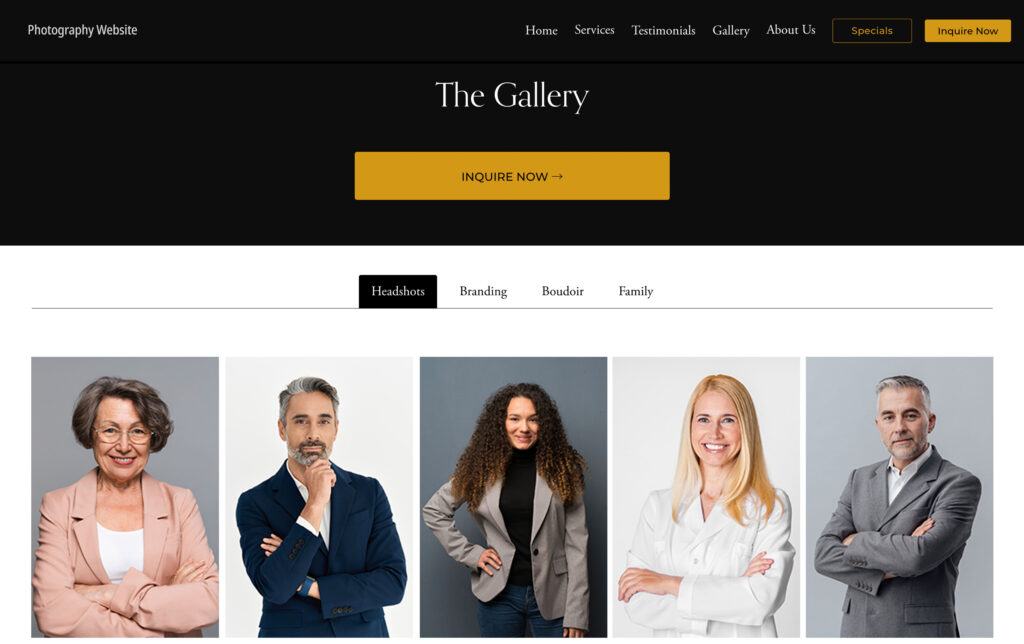
A common mistake is curating based on your personal favorites. Instead, think like a client. Showcase diversity in backgrounds, poses, age groups, and demographics. When potential clients can see someone like themselves in your work, they start to imagine their own session with you. That shift from “nice photos” to “that could be me” is what drives bookings.
Showcase Enough to Inspire, Not Overwhelm
Dumping hundreds of images into a single gallery might look impressive, but it overwhelms visitors and causes decision fatigue. A tighter selection of 20–40 carefully chosen images is far more persuasive. This size allows you to show range without losing focus. It also keeps clients engaged long enough to feel excited, rather than exhausted.
Add Context That Reinforces Value
A photo without context is just a pretty picture. Strategic captions like “Luxury boudoir photoshoot in downtown Vancouver” or “Executive headshots for a finance firm” help visitors understand your services and locations. These captions double as SEO boosters and subtle sales messages. Each one confirms, “Yes, this photographer offers exactly what I need.”
Build Trust Along the Way
Today’s clients are skeptical. Adding a testimonial card, review snippet, or “As Seen In” media logo directly within your gallery reassures them that others have invested in you and had a positive experience. This social proof turns curiosity into confidence. The more trust markers you layer in, the easier it becomes for prospects to justify booking at a premium price.
Always Lead to Action
Many galleries miss the simplest piece of the puzzle: a clear call to action. After stirring desire and building trust, the gallery should guide visitors to the next step. Whether it’s “Book Your Session,” “Schedule a Consultation,” or “Check Availability,” the path forward must be obvious. Without a CTA, your gallery entertains but fails to convert.
When these principles work together, your gallery becomes much more than a portfolio. It becomes a conversion engine that shows off your work, connects emotionally with clients, builds credibility, and guides them to book with confidence.
Common Mistakes Photographers Make With Galleries
Even the best photographers lose bookings because their galleries unintentionally push clients away. These mistakes go beyond design and directly impact trust, emotion, and conversions.
Too many galleries are designed as if they were art portfolios, meant to impress other photographers rather than sell to clients. A portfolio says, “Look what I can do.” A sales-driven gallery says, “Here’s what I can do for you.” Clients do not want to be dazzled by technical brilliance—they want to know if you can capture their story, their family, or their brand in a way that feels personal. When you fail to frame the gallery as a sales asset, you miss the chance to move visitors closer to booking.
Forgetting the Buyer’s Journey
A client’s decision to book does not happen in one leap. They move through stages: curiosity, interest, reassurance, and finally commitment. Yet many galleries are just random photo dumps with no flow or intent. Without guiding visitors through a journey—starting with aspirational hero shots, building with variety and proof, and ending with a clear CTA—you leave them stranded in the middle. A gallery without structure creates noise instead of narrative, and that noise kills conversions.
Showing Only One Type of Client
If every photo in your gallery features the same body type, age group, or style, you unintentionally send a limiting message: “I only work with people like this.” That narrows your appeal. Today’s clients are diverse, and they want to see themselves represented. By showcasing variety—different demographics, moods, and looks—you expand your market and make more people feel welcome. A gallery that lacks diversity not only reduces bookings but also positions you as less versatile.
Not Refreshing the Gallery Regularly
A gallery frozen in time suggests stagnation. When clients see outdated photos, they may assume your skills or style have not evolved, or worse, that you are not actively booking. In reality, you may be busier than ever, but your gallery tells a different story. Refreshing galleries every 6–12 months signals momentum, current relevance, and professionalism. It shows clients you are in demand and aligned with modern styles, which increases trust and perceived value.
Ignoring Emotional Storytelling
Photography is not just technical; it is emotional. Clients are not buying a picture, they are buying a feeling—confidence in a branding portrait, intimacy in a boudoir session, or joy in a family shoot. Yet many galleries focus only on technical variety: different poses, lighting, or backdrops, without conveying emotional depth. A gallery that does not make people feel something will not move them to act. Storytelling images capture emotion, and emotion is what sells.
When you avoid these mistakes, your gallery shifts from passive decoration to an active sales driver. Instead of leaving money on the table, you begin to pre-sell sessions, ease client objections, and close bookings with far less effort.
Advanced Tactics That Turn Galleries Into Sales Machines
Once the basics of gallery structure are in place, the next step is elevating your approach from functional to high-converting. This is where most photographers stop short—they build a gallery that looks nice but fail to engineer it as part of their sales system. Advanced tactics are what transform a gallery from a showcase into a revenue driver.
- Use PR Features as Authority Anchors: Most photographers never think to integrate press features into their galleries. Yet seeing “As Featured In Vogue” or “Published in Forbes” alongside your images instantly changes client perception. These authority markers are not vanity—they reduce price objections and reframe your services as premium. Every gallery should include subtle PR signals that confirm clients are making a smart, validated choice.
- Layer in Social Proof Within the Scroll: Do not wait until a separate reviews page to show testimonials. Drop short client quotes directly inside your galleries, ideally near the middle when visitors are most engaged. Pair a powerful testimonial with a matching image so the words and visuals reinforce each other. This simple move can double trust without adding friction.
- Design for Ad Traffic: If you are running Google Ads or social campaigns, your galleries should be optimized as landing pages. Match ad copy to gallery headlines for message consistency. Ensure the call to action is visible above the fold. A gallery that feels like a seamless continuation of an ad creates higher conversions and lowers cost per lead.
- Showcase Full Session Collections: Instead of pulling one or two images from many clients, show the depth of a complete shoot. For example, a branding gallery might display a full session including wardrobe changes, props, and lifestyle shots to demonstrate variety. A boudoir gallery could highlight the range of poses and styles a client walks away with. These collections help potential clients visualize the final product, not just isolated images. They work powerfully on both galleries and service pages to set clear expectations and show value.
- Showcase Transformations: One of the most powerful sales tools is showing before-and-after impact. Pair a “before” shot with an “after” image from the same session, or include a testimonial about how a shoot transformed confidence or business presence. Transformation galleries prove you deliver results, not just pretty pictures, which is what premium clients are really buying.
- Connect Galleries to a Larger Conversion System: A gallery should not exist in isolation. It should plug into a bigger system of visibility and authority. Run ads directly to curated service galleries, reinforce those galleries with PR features for trust, and connect them to SEO-optimized blog content for discoverability. This integration creates omnipresence and ensures your gallery is not just a page on your site, but a conversion machine that works across all marketing channels.
Case Study: Charleston Luxury Photographer
Stephanie came to us as a luxury portrait photographer booking around 50 leads a month. Her galleries looked beautiful but were not optimized for sales. After restructuring her galleries into service-specific collections, layering in PR features, embedding testimonials, and running targeted Google Ads directly to those pages, her results changed dramatically. Within six months she scaled to over 150+ monthly leads, with clients arriving pre-sold on her value and premium pricing.
When advanced tactics like these are in play, your gallery stops being a static display of images and becomes an active driver of sales. Each element—press features, testimonials, session collections, and conversion-focused design—works together to create trust, urgency, and clarity. The result is a gallery that not only impresses but also persuades, setting you apart from competitors and attracting clients who are ready to invest.
The Power Positioning Method Applied to Gallery Pages
A gallery on its own can convert better with the right structure, but the real magic happens when it is connected to the larger ecosystem of your marketing. At Photographers Advantage, this is where our Power Positioning Method comes into play. We treat the gallery as one pillar of a complete conversion system that makes photographers visible, credible, and chosen.
- SEO and Local Search bring qualified traffic to your galleries when clients search for services in your market. A gallery structured for clarity and relevance helps keep those visitors engaged.
- PR Features layered into galleries build authority, showing potential clients that your work is recognized and validated by trusted publications.
- Paid Ads send high-intent buyers directly to the right service gallery, matching ad copy to the headline so the message is seamless and persuasive.
- Conversion Design inside the gallery then takes over, leading visitors from curiosity to confidence to booking.
When all four pillars work together, your gallery stops being a digital portfolio and becomes a core driver of your sales funnel. It is no longer just a place for pretty photos—it becomes a system that consistently brings in high-quality, pre-sold clients who are ready to invest.
Conclusion: Turn Your Gallery Into Your Best Salesperson
Most photographers underestimate the power of a gallery page. They see it as a portfolio when in reality it should function as one of the most persuasive sales tools in their business. A well-structured gallery helps clients see themselves in your work, builds trust, eliminates hesitation, and makes booking feel like the natural next step.
When you take it further—using advanced tactics like showcasing full session collections, layering in PR features, and designing galleries for ad traffic—your gallery stops being passive and starts actively creating revenue. And when you connect it to the full Power Positioning Method of SEO, local search, PR, and ads, you create a complete conversion system that scales.
At Photographers Advantage, we specialize in building these systems for studios who want more than likes or compliments. Our galleries, paired with the right marketing strategy, help photographers attract high-value clients, shorten sales cycles, and grow their business with confidence. If you are ready to turn your gallery into a conversion machine and position your brand as the obvious choice in your market, book a consultation with Photographers Advantage today.
Frequently Asked Questions
-
How to make a photography gallery page?
To make a photography gallery page, start by creating separate galleries for each service you offer. Curate 20–40 images that represent variety and allow clients to see themselves in your work. Add captions for clarity, optimize for mobile, and include a clear call to action. A well-designed gallery page is not just a showcase—it’s a conversion tool for photographers.
-
Photography gallery page examples?
Strong photography gallery page examples usually include dedicated galleries for portraits, weddings, branding, or family sessions. They show complete collections rather than random photos, use clean layouts, and highlight testimonials or reviews alongside images. Many top photographer websites also integrate “As Seen In” press logos. Studying these examples can help photographers design galleries that attract clients, reduce objections, and position their services as premium in competitive markets.
-
Best photography gallery page designs?
The best photography gallery page designs are simple, intentional, and sales-driven. They avoid overwhelming image walls and instead showcase a curated mix of photos that tell a story. Galleries with clear categories, mobile optimization, and fast load times perform best. Adding context like captions, testimonials, or press mentions elevates design from aesthetic to functional, helping photographers convert casual browsers into paying photography clients with confidence and ease.
-
What should a photography gallery page include?
A photography gallery page should include curated images that represent your services, clear categories for each session type, and concise captions for context. It should also feature a call to action that guides visitors to book or inquire, plus trust elements like testimonials, reviews, or press features. Together, these elements create a gallery that builds trust, engages visitors, and drives more client inquiries for photographers.
-
How many photos should be in a photography gallery?
A photography gallery should typically include 20–40 images per service. This number is enough to show variety in style, settings, and client types without overwhelming visitors. Too few images limit trust, while too many cause decision fatigue. A well-curated collection helps potential photography clients quickly see themselves in your work, leading to stronger engagement and more booking inquiries through your gallery page.
-
How long should a photography gallery be?
A photography gallery should be long enough to demonstrate depth but short enough to maintain attention. For most photographers, this means 20–40 high-impact photos per gallery page. Length is not measured in scroll depth alone, but in how effectively the gallery guides visitors. Balanced galleries provide variety, highlight emotion, and end with a call to action, turning website traffic into serious client inquiries.
-
What is the difference between a gallery page and a portfolio?
A gallery page is designed for clients, while a portfolio often showcases technical skill for peers or competitions. A photography gallery page is sales-driven: organized by service, curated to spark emotional connection, and built with calls to action. A portfolio may highlight artistic range or awards. Photographers who treat their gallery as a conversion tool, not just a portfolio, see more client bookings and revenue growth.
-
Do gallery pages help photographers get more clients?
Yes. A photography gallery page can significantly increase inquiries by helping potential clients see exactly what to expect. Organized galleries create clarity, while curated images spark trust and connection. When combined with captions, testimonials, and strong calls to action, galleries become one of the most powerful tools on a photographer’s website for converting visitors into paying clients ready to invest in professional services.
-
Should a photography gallery page have captions?
Yes. Captions on photography gallery pages improve clarity for clients and SEO for search engines. A caption like “Branding session in Charleston” or “Luxury family portraits on the beach” tells visitors what they are viewing while boosting keyword relevance. Captions reinforce services, locations, and outcomes, making your gallery more than a set of images. They also reduce confusion, helping potential clients move from browsing to booking confidently.
-
Should photographers add testimonials to gallery pages?
Yes. Testimonials are a trust-building tool that helps photography galleries convert more effectively. Adding client quotes directly within the gallery reassures visitors that others have booked and loved the experience. When paired with an image from the session, testimonials create a powerful connection between visuals and results. This subtle sales element turns your gallery from a showcase into a persuasive asset that attracts new photography clients.
-
Do press features help photography gallery pages convert?
Absolutely. Featuring “As Seen In” press logos or magazine features on a photography gallery page builds authority instantly. Press coverage works as third-party validation, signaling to clients that your work is trusted and respected. When combined with strong imagery, press features reduce price objections and make your services feel premium. This small addition can dramatically increase conversions and attract higher-value photography clients through your galleries.
-
Should a gallery page show full sessions or just highlights?
Photographers should use a balance. Highlights provide quick inspiration, but full session collections show the depth clients can expect. A gallery that includes several images from a complete session demonstrates variety, storytelling, and consistency. This approach helps clients visualize the final product they will receive, rather than assuming quality from one shot. Full session previews often increase confidence and lead to more client bookings.
-
How often should photographers update their gallery pages?
Photographers should update gallery pages at least every 6–12 months. Regular updates keep content fresh, reflect your current style, and show that you are actively booking clients. Outdated galleries can make your business look stagnant. Adding recent sessions signals momentum and relevance, while also boosting SEO performance. Fresh galleries give potential clients confidence that you are experienced, in demand, and aligned with modern photography trends.
-
Does a mobile-friendly photography gallery improve inquiries?
Yes. Most clients browse photography websites on mobile devices. A mobile-friendly gallery that loads quickly and displays beautifully on smaller screens dramatically improves user experience. If a gallery is slow or awkward on mobile, potential clients often leave before inquiring. Optimized mobile galleries keep visitors engaged, showcase images clearly, and make calls to action easy to tap—resulting in more inquiries and bookings for photographers.